

If you’re scaling past shared hosting and want real control without breaking the bank, Verpex VPS hosting is a smart next step. You get dedicated virtual resources, fast NVMe storage, and the option to go managed or unmanaged once you understand how VPS hosting works. In this guide, we break down plans, compare VPS hosting vs dedicated hosting, and explain who should choose what—so you pick with confidence. We’ll also highlight what Verpex reviews and overall VPS rating sentiment say about performance, support, and value. Ready to upgrade your stack and keep your site quick under load? Let’s dive in.
1. What Is VPS Hosting and How It Works
Understanding VPS Hosting
A Virtual Private Server (VPS) is a hosting solution where a single physical server is divided into several isolated virtual environments. Each VPS has its own operating system, dedicated resources, and the freedom to install and configure software as you wish. In simple terms, you’re renting a slice of a powerful server that behaves like a private machine.
Think of it like living in an apartment inside a large building. The structure is shared, but your apartment is yours—you have your own key, your own utilities, and control over the interior. That’s exactly how VPS hosting works: you share the server’s hardware with others, but your allocated space and resources remain private.
How VPS Hosting Works
VPS hosting relies on a technology called virtualization. A special layer, often referred to as a hypervisor, divides the physical server into multiple virtual machines. Each of these virtual machines operates independently, meaning your website’s performance isn’t directly affected by what others on the same server are doing.
When you choose Verpex VPS hosting, you can pick between managed and unmanaged options.
- Managed VPS: The hosting provider takes care of updates, security patches, and server monitoring.
- Unmanaged VPS: You get full control over configurations, but you handle maintenance and troubleshooting yourself.
This flexibility is one of the reasons why VPS rating scores for Verpex are often high in Verpex reviews—it appeals to both beginners and advanced users.
VPS Hosting vs Shared Hosting
| Feature | Shared Hosting | VPS Hosting |
|---|---|---|
| Resources | Shared between all users | Dedicated virtual resources |
| Performance | Can slow down if others use too much power | Stable and consistent |
| Control | Limited customization | Full root or admin access |
| Security | Risks from other users’ activities | Isolated environment reduces risks |
| Cost | Cheapest option | Higher price, but better performance |
In shared hosting, you’re in the same “room” as many other websites, and their traffic spikes can slow you down. In VPS hosting, you have your own “private office” in the building—more control, privacy, and resources.
VPS Hosting vs Dedicated Hosting (Quick Context)
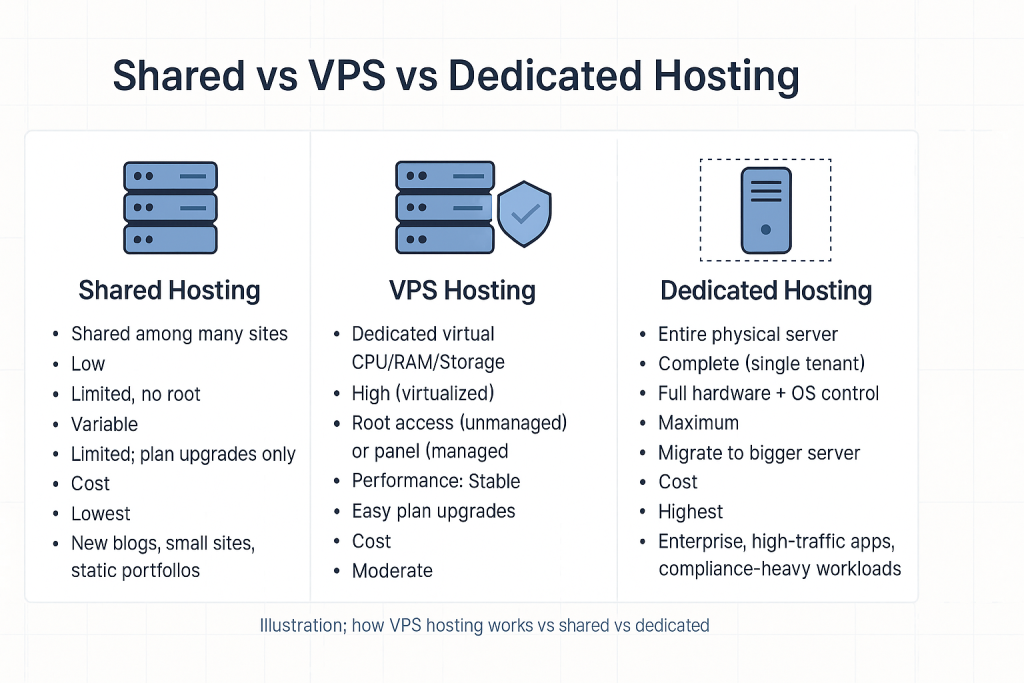
Later in this article, we’ll explore VPS hosting vs dedicated hosting in more depth. For now, know that VPS is more affordable and flexible, while dedicated hosting gives you an entire physical server for maximum performance. VPS is often the middle ground—perfect for growing businesses that need better speed and control without the high costs of a dedicated server.
2. Overview of Verpex as a Hosting Provider
Verpex is a relatively young but fast-growing hosting company that has quickly built a reputation for flexibility, customer-first service, and competitive pricing. Founded with the goal of making premium hosting accessible to everyone, Verpex now serves customers in over 120 countries, powering websites for small businesses, developers, and large online platforms alike.
From shared hosting plans to advanced Verpex VPS hosting, the company’s portfolio is designed to cater to a broad range of technical needs. Their infrastructure runs on modern data centers located across multiple continents, helping reduce latency and improve loading speeds for global audiences.

Reputation and VPS Ratings
Across independent Verpex reviews, the company often receives strong VPS rating scores for uptime reliability, technical support, and value for money. Users frequently highlight the quick response times from their 24/7 support team, as well as the smooth migration services for those switching from other hosts.
What stands out is how Verpex positions its VPS plans: they’re not just for developers with years of experience—beginners who want to learn how VPS hosting works can start small and scale up easily as their traffic grows. This balanced approach between performance and accessibility has earned Verpex positive recognition on multiple review platforms.
Position in the Hosting Market
In a crowded hosting industry, Verpex has carved out a niche by offering:
- Flexible hosting tiers — from entry-level shared hosting to high-performance VPS and dedicated solutions.
- Transparent pricing with clear renewal rates.
- Choice between managed and unmanaged VPS for different skill levels.
- Global reach through strategically located servers.
This combination allows them to compete directly with bigger, more established brands, while maintaining the personalized support and agility of a smaller company.
For anyone comparing VPS hosting vs dedicated hosting, Verpex’s VPS line offers a cost-effective middle ground—enough power to handle demanding sites without the expense of renting an entire server.

3. Verpex VPS Hosting Plans
One of the strengths of Verpex VPS hosting is the flexibility it offers. Whether you’re a developer looking for full control, or a business owner who prefers a hands-off approach, there’s a plan tailored to your needs. Verpex splits its VPS lineup into four main categories: Unmanaged Linux VPS, Managed Linux VPS, Unmanaged Windows VPS, and Managed Windows VPS.

Unmanaged Linux VPS
Perfect for users who understand how VPS hosting works and want maximum control over their environment. You’ll handle updates, security patches, and configurations, while Verpex provides the raw resources and server stability.
| Plan | CPU Cores | RAM | Storage (NVMe SSD) | Intro Price | Renewal Price |
|---|---|---|---|---|---|
| VPS-D2 | 2 vCPU | 4 GB | 80 GB | $7.19/mo | $11.99/mo |
| VPS-D4 | 4 vCPU | 8 GB | 160 GB | $10.79/mo | $17.99/mo |
| VPS-D16 | 8 vCPU | 16 GB | 320 GB | $16.19/mo | $26.99/mo |
| VPS-D32 | 16 vCPU | 32 GB | 640 GB | $37.79/mo | $62.99/mo |
These plans often receive high VPS rating scores for performance and stability, especially among tech-savvy users.
Managed Linux VPS
Ideal for those who want the power of VPS without the hassle of day-to-day management. Verpex handles server maintenance, security monitoring, and backups, allowing you to focus entirely on your website or applications.
| Plan | CPU Cores | RAM | Storage (NVMe SSD) | Intro Price | Renewal Price |
|---|---|---|---|---|---|
| Managed D4 | 2 vCPU | 4 GB | 80 GB | $23.34/mo | $38.90/mo |
| Managed D8 | 4 vCPU | 8 GB | 160 GB | $41.40/mo | $69.00/mo |
This option is especially popular in Verpex reviews from small businesses and agencies who value reliability over full customization.
Unmanaged Windows VPS
For developers and businesses running Windows-based applications, this option delivers full control and Plesk access. You’ll be responsible for system updates, but you get complete flexibility to configure your Windows environment.
| Plan | CPU Cores | RAM | Storage (NVMe SSD) | Intro Price | Renewal Price |
|---|---|---|---|---|---|
| Windows D4 | 2 vCPU | 4 GB | 80 GB | $18.00/mo | $30.00/mo |
| Windows D8 | 4 vCPU | 8 GB | 160 GB | $30.00/mo | $50.00/mo |
| Windows D16 | 8 vCPU | 16 GB | 320 GB | $53.40/mo | $89.00/mo |
Managed Windows VPS
A rare find in the hosting world, Verpex offers managed Windows VPS for businesses that need Microsoft environments but don’t want to manage them themselves. You get Plesk control, security monitoring, and proactive support.
Choosing the Right Plan
When deciding between VPS hosting vs dedicated hosting, many businesses find that Verpex VPS hosting delivers more than enough performance for a fraction of the cost.
- Go unmanaged if you want full control and have the technical skills.
- Choose managed if you prefer convenience and expert oversight.
| Linux | Windows | ||||||||||||||||||||||||||||||||||||||||||||||||||||||||
|---|---|---|---|---|---|---|---|---|---|---|---|---|---|---|---|---|---|---|---|---|---|---|---|---|---|---|---|---|---|---|---|---|---|---|---|---|---|---|---|---|---|---|---|---|---|---|---|---|---|---|---|---|---|---|---|---|---|
Unmanaged Linux VPS
|
Unmanaged Windows VPS
|
||||||||||||||||||||||||||||||||||||||||||||||||||||||||
Managed Linux VPS
|
Managed Windows VPS
|
Prices shown for 12-month billing at time of capture; verify current pricing on checkout.
4. Managed vs Unmanaged VPS at Verpex
When choosing Verpex VPS hosting, one of the first decisions you’ll make is whether to go for a managed or unmanaged plan. Both use the same high-performance infrastructure, but they differ in how much responsibility you take for the server’s day-to-day operation.
Managed VPS – Hosting on Autopilot
With a managed VPS, Verpex takes care of most of the technical heavy lifting. This includes:
- Server setup and configuration
- Software updates and security patches
- Ongoing monitoring to detect and fix issues
- Daily backups and restoration support
This option is ideal for business owners, agencies, or individuals who want the performance benefits of a VPS without having to learn every detail of how VPS hosting works. In many Verpex reviews, customers highlight the peace of mind that comes with knowing experts are monitoring their hosting 24/7. While managed VPS is slightly more expensive, it often gets higher VPS rating scores from users who value stability and minimal downtime.
Unmanaged VPS – Full Control, Full Responsibility
Unmanaged VPS is all about freedom. You get:
- Root access for complete control over the operating system
- Ability to install, configure, and optimize software to your exact needs
- Greater flexibility for custom development environments
This route is perfect for developers, system administrators, and technically confident users who prefer to maintain their own systems. The trade-off? You’re also responsible for updates, security hardening, and troubleshooting—tasks that can be time-consuming if you’re not already familiar with server management.
Which Should You Choose?
If you run a growing business and prefer to focus on strategy, marketing, or content rather than server configurations, a managed VPS is the safer bet. On the other hand, if you have the skills—or a dedicated technical team—an unmanaged VPS can give you more flexibility at a lower monthly cost.
From my perspective, I’ve seen many small businesses start with a managed plan for stability, then move to unmanaged as their technical knowledge grows. The key is matching the hosting type to your comfort level with server management.

5. VPS Hosting vs Dedicated Hosting (Brief Comparison)
When comparing VPS hosting vs dedicated hosting, the biggest difference lies in ownership of resources. With a VPS, you rent a virtualized portion of a physical server. With a dedicated server, the entire physical machine is yours. Both have advantages, and the right choice depends on your performance needs, budget, and technical skill set.
Key Differences at a Glance
| Feature | VPS Hosting | Dedicated Hosting |
|---|---|---|
| Resources | Dedicated virtual resources shared on one server | All resources of the server are yours exclusively |
| Performance | High performance for most use cases, but still limited by the host server | Maximum performance with no resource sharing |
| Scalability | Easy to upgrade or downgrade plans | Scaling often requires migrating to a new, more powerful server |
| Cost | More affordable, ideal for growing sites | Higher monthly cost due to exclusive hardware |
| Management | Can be managed or unmanaged | Can be managed or unmanaged, but more complex to maintain |
| Use Cases | Websites, eCommerce stores, SaaS apps, staging environments | High-traffic enterprise sites, resource-heavy applications, large databases |
When to Choose VPS Hosting
For many businesses, Verpex VPS hosting hits the sweet spot between cost and capability. It’s ideal when:
- You’ve outgrown shared hosting
- You need more control over software and configurations
- You want better performance without the cost of a dedicated machine
The VPS rating for Verpex VPS often reflects this balance—it offers excellent performance for a price that’s still manageable for most growing businesses.
When to Upgrade to Dedicated Hosting
A dedicated server becomes appealing when:
- Your site handles extremely high traffic and resource usage
- You run applications requiring complete hardware isolation
- Security policies demand physical server exclusivity
In other words, if you’re pushing your VPS to its limits and performance is still falling short, upgrading to dedicated hosting can provide that extra power and stability.

6. Pros and Cons of Verpex VPS Hosting
Verpex VPS hosting aims to give you fast performance, clean scaling, and real support without the price jump of a full dedicated server. Here’s a clear, no-fluff view to help you decide.
Key Advantages
- Performance you can feel
NVMe storage and dedicated virtual resources keep sites snappy even during traffic spikes—this is where many Verpex reviews praise speed and stability. - Flexible control
Pick managed or unmanaged. Managed saves time; unmanaged gives full root access for custom stacks. This fits both beginners and power users who know how VPS hosting works. - Fair pricing for growth
Lower entry cost than a physical server, with simple upgrades as needs rise—ideal bridge in VPS hosting vs dedicated hosting. - Support that answers
24/7 help, easy migrations, and clear guidance earn strong community trust and solid VPS rating sentiment. - Clean path to scale
Start small, add CPU/RAM/storage as projects grow without moving providers.
Potential Drawbacks
- No free tier
You’ll need a paid plan from day one (common for VPS, but worth noting). - Renewal vs promo gap
Intro prices are lower than renewals; plan your long-term budget. - Add-on costs
Panels (cPanel/Plesk), backups, and licenses can raise the bill depending on your stack. - Learning curve (unmanaged)
If you go unmanaged, updates, security, and troubleshooting are on you. - Location fit
Data center choices are broad, but may not match every niche region perfectly.
Quick Take: Who Benefits Most
- Managed VPS: Agencies, eCommerce owners, and teams that want uptime and speed without server chores.
- Unmanaged VPS: Developers and sysadmins who want full control, custom stacks, and command-line freedom.
Bottom line: For most growing sites, Verpex VPS hosting hits the sweet spot—faster and more secure than shared hosting, far cheaper and easier to maintain than a dedicated box. That’s why Verpex reviews often highlight value, support, and simple scaling, and why overall VPS rating sentiment trends positive.

7. Verpex Reviews and VPS Ratings
Across public Verpex reviews, the sentiment is consistent: Verpex VPS hosting scores well for speed, helpful support, and value. Users like the quick setup, smooth migrations, and the choice between managed and unmanaged servers once they understand how VPS hosting works. Where feedback turns cautious is renewal pricing and paid add-ons (e.g., panels or extra backups).
What Users Say (Condensed)
| Area | Typical Feedback from Users | What It Means for You |
|---|---|---|
| Performance | Fast load times, steady uptime on NVMe storage. | Good baseline speed for stores, apps, and multi-site stacks. |
| Support | Friendly, responsive 24/7 team; strong migration help. | Safer pick if you want human help on day one. |
| Ease of Use | Simple onboarding; managed plans feel “hands-off.” | Good fit if you prefer less server admin work. |
| Value | Intro pricing feels competitive vs peers. | Solid entry point before you compare long-term costs. |
| Scalability | Easy plan upgrades without service disruption. | Start small, grow as traffic and workload increase. |
| Reliability | Stable over time; quick fixes when issues arise. | Fewer nasty surprises during peak hours. |
Constructive Themes (What to Watch)
- Renewal vs promo gap: Renewal prices are higher than intro deals—budget for the long term.
- Add-on costs: cPanel/Plesk licenses, snapshots, and advanced backups can raise the bill.
- DIY on unmanaged: Great control, but you handle updates, hardening, and troubleshooting.
- Data center choice: Locations cover most needs, but niche regions may be limited.
Interpreting the VPS Rating
Most VPS rating summaries reflect strong value for small to mid-size projects: agencies, WooCommerce stores, SaaS prototypes, and content sites. If you’re weighing VPS hosting vs dedicated hosting, reviewer sentiment suggests starting with VPS and upgrading only when CPU/RAM or strict compliance demands an isolated physical server.

8. Who Should Choose Verpex VPS Hosting
Verpex VPS hosting fits a wide range of projects— from a first serious WordPress build to busy online stores and agency portfolios. If you understand the basics of how VPS hosting works, you can pick a setup that matches your goals without jumping straight to a dedicated server. Here’s a clear guide.
Best-Fit Profiles (and What to Pick)
| Profile / Use Case | What You Need | Verpex VPS Type | Why It Fits |
|---|---|---|---|
| Solo developer / technical user | Root access, custom stacks, staging | Unmanaged Linux VPS | Full control for Docker, custom Nginx/PHP, CI/CD. |
| Agencies managing client sites | Stability, backups, help on call | Managed Linux VPS | Verpex handles updates and monitoring so teams ship faster. |
| WordPress & content sites (10k–100k visits/mo) | Fast page loads, easy scaling | Managed Linux VPS (start 2–4 vCPU, 4–8 GB RAM) | NVMe storage and managed care keep sites smooth during peaks. |
| WooCommerce / eCommerce | Consistent CPU/RAM, security | Managed Linux VPS (4–8 vCPU, 8–16 GB RAM) | Cart and checkout stay responsive during promos. |
| SaaS / APIs / microservices | Custom runtimes, isolation | Unmanaged Linux VPS (4+ vCPU) | Freedom to tune services, workers, queues. |
| Windows apps / .NET dashboards | IIS, MSSQL, Plesk | Unmanaged Windows VPS or Managed Windows VPS | Windows stack without buying a full server. |
| Game servers / communities | Low latency, quick restarts | Unmanaged Linux VPS (higher clock, 4–8 vCPU) | Direct control over game binaries and mods. |
| Regional brands / multi-geo | Lower latency by region | Any VPS, pick closest DC | Place workloads near users; scale per location. |
Tip: If you’re torn between VPS hosting vs dedicated hosting, start with VPS. Move to a dedicated server only when you consistently hit CPU/RAM ceilings or strict compliance needs demand single-tenant hardware.
Quick Sizing Guide (Practical Targets)
- Starter blogs & landing pages: 2 vCPU, 4 GB RAM, NVMe 80 GB
- Busy WordPress or small shop: 4 vCPU, 8 GB RAM, NVMe 160 GB
- Heavier eCommerce / SaaS: 8 vCPU, 16 GB RAM, NVMe 320 GB+
Scale storage first if you host lots of media; scale CPU/RAM for dynamic workloads.
Managed vs Unmanaged—Choose by Time, Not Ego
- Pick Managed if uptime, backups, and security updates should “just work.” Great for owners who want results without server chores.
- Pick Unmanaged if you enjoy tuning servers, need custom kernels/modules, or plan heavy automation.
What Verpex Reviews and VPS Ratings Suggest
Across Verpex reviews, users highlight fast support and smooth migrations. VPS rating sentiment is strong for performance-per-dollar and easy scaling. The most common caution is budgeting for renewals and optional panel licenses. If that fits your plan, you’re in the sweet spot.

Conclusion
Verpex VPS hosting hits the sweet spot for most growing sites: strong performance, real control, and easy scaling without paying for an entire machine. Pick managed if you want support handling updates and backups; choose unmanaged if you’re comfortable running the stack yourself. Start small, watch resource usage, and scale up as traffic grows. If you outgrow a VPS or need strict isolation, that’s the moment to revisit VPS hosting vs dedicated hosting.
Across Verpex reviews and overall VPS rating sentiment, strengths include fast help, smooth migrations, and good value, with the usual cautions on renewals and optional panel licenses. If this aligns with your needs—and you understand how VPS hosting works—spin up a plan, test your workloads, and iterate. Ready to move? Try Verpex now and keep building.
Want more context beyond VPS? See my deep dives on [Verpex Cloud Hosting] and [Verpex Web Hosting].


